

Dispatch Monitor & Users
Create logins for your call-centre staff and watch every booking they make in the dispatcher panel.
The dispatcher panel is a separate web panel for call-centre operators: they book rides for customers who phone or walk in, and assign drivers by hand. From the admin panel you do two things for it:
- Dispatch Users: create and manage the dispatcher accounts.
- Dispatch Monitor: a live log of every booking made through the dispatcher panel.
Dispatch users#
Open Dispatch Users (under Dispatch Management in the menu).

- 1Search by name or email.
- 2Add a dispatcher.
- 3Status: switch off to block this dispatcher from signing in.
- 4View details.
- 5Edit.
- 6Delete.
Create a dispatcher login#
Click + Add Dispatch User#
The Add Dispatch User form opens.
Profile picture (optional)#
Click Upload Profile and choose a .jpg, .jpeg or .png image.
Name, email and phone#
Fill in First Name, Last Name, Email and Phone Number (with country code). The email is the dispatcher's username.
Password#
Type a Password of at least 6 characters and the same again in Confirm Password.
Save#
MyTaxi creates the sign-in account in Firebase Authentication and the dispatcher record. "Dispatch user created successfully." The new user is active straight away.
Send the details to the dispatcher#
Give them the dispatcher panel's web address, their email and password. They sign in at the dispatcher panel, not the admin panel. See Dispatcher panel.
Email already in use
Each email can have only one Firebase sign-in account. If the email already belongs to an admin employee or another dispatcher, you will see "Email already in use." Use a different email for each person.
Edit, block or delete#
| Action | What happens |
|---|---|
| View (eye) | Shows the Dispatch User Details: picture, name, email, phone and status. |
| Edit (pencil) | Change the name, phone and picture. The email cannot be changed and there is no password field when editing. |
| Status switch | Off: the dispatcher can no longer sign in; the panel shows "Your account has been disabled. Contact admin." Switch it back on to give access again. |
| Delete (bin) | Removes the dispatcher record; that email can no longer sign in to the dispatcher panel ("Access denied. Account not found."). The Firebase Authentication account itself stays; delete it in the Firebase console if you want to reuse the email. |
Forgot password
There is no password change on this screen. To reset a dispatcher's password, use Authentication › Users in the Firebase console, or delete the user there and here and create them again.
Dispatch monitor#
Open Dispatch Monitor. It lists, live, every booking made in the dispatcher panel (cab, parcel, intercity and rental), newest first, 15 per page.
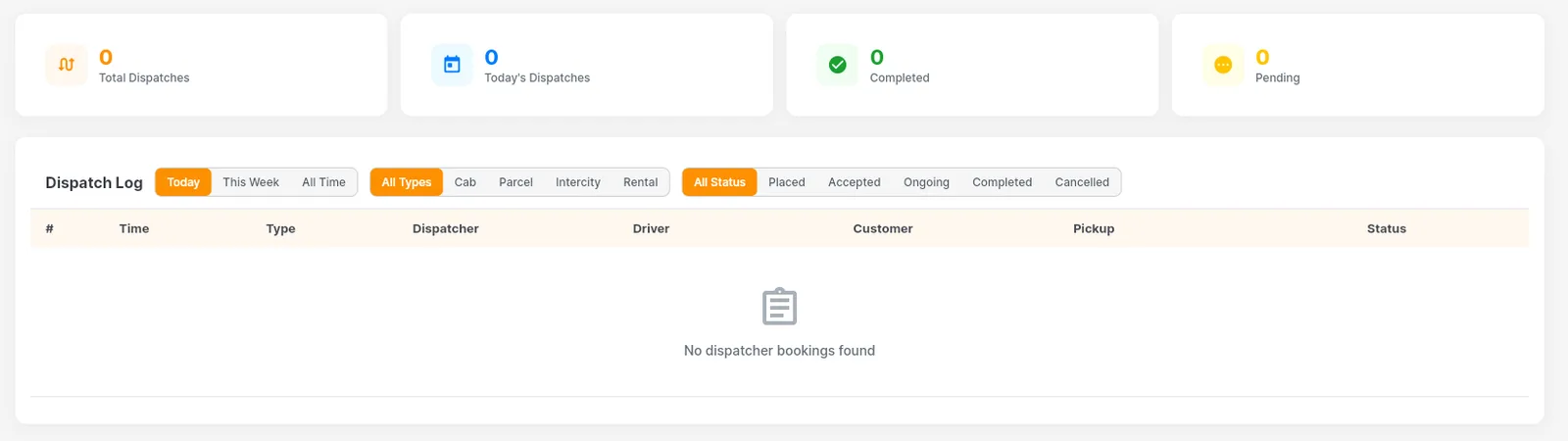
- 1Totals: Total Dispatches, Today's Dispatches, Completed and Pending.
- 2Time: Today, This Week (last 7 days) or All Time.
- 3Ride type: All Types, Cab, Parcel, Intercity, Rental.
- 4Status: All, Placed, Accepted, Ongoing, Completed, Cancelled.
- 5The Dispatch Log.
The totals#
| Card | Counts |
|---|---|
| Total Dispatches | All dispatcher bookings in the selected time range. |
| Today's Dispatches | Dispatcher bookings created today. |
| Completed | Dispatcher bookings that finished. |
| Pending | Dispatcher bookings still Placed, Accepted or Ongoing. |
The cards follow the time filter but not the type and status filters, so they always show the whole picture for that period.
The Dispatch Log#
Each row shows the Time the booking was created, the ride Type, the Dispatcher who made it, the Driver, the Customer, the Pickup address and the booking Status. "No dispatcher bookings found" means nothing matches the filters (on a new installation, try All Time).
Only dispatcher bookings appear here
Bookings made in the customer app are not in this log. All bookings, including dispatcher ones, are also in Bookings & ride history.
Who can manage dispatchers?
Admins and employees whose role has the Dispatcher Panel permission (view, add, update, delete). See Roles & employees.
Can a dispatcher sign in to the admin panel?
No. Dispatcher accounts only work in the dispatcher panel. For admin panel staff, create an employee in Roles & employees.