

Documents & Verification
Decide what drivers and restaurant owners must submit (files, written answers or choices) and how you approve it.
The Documents page is your checklist for new drivers and restaurant owners. Each entry is one thing they must provide: a licence photo, a registration number, a yes/no question, and so on. The apps build their documents screen from this list, so you can change it at any time without updating the apps.
Documents are only asked for when verification is switched on: Driver Document Verification in Driver Settings and Vendor Document Verification in Restaurant Settings.
The documents list#
Open Service ManagementDocuments.
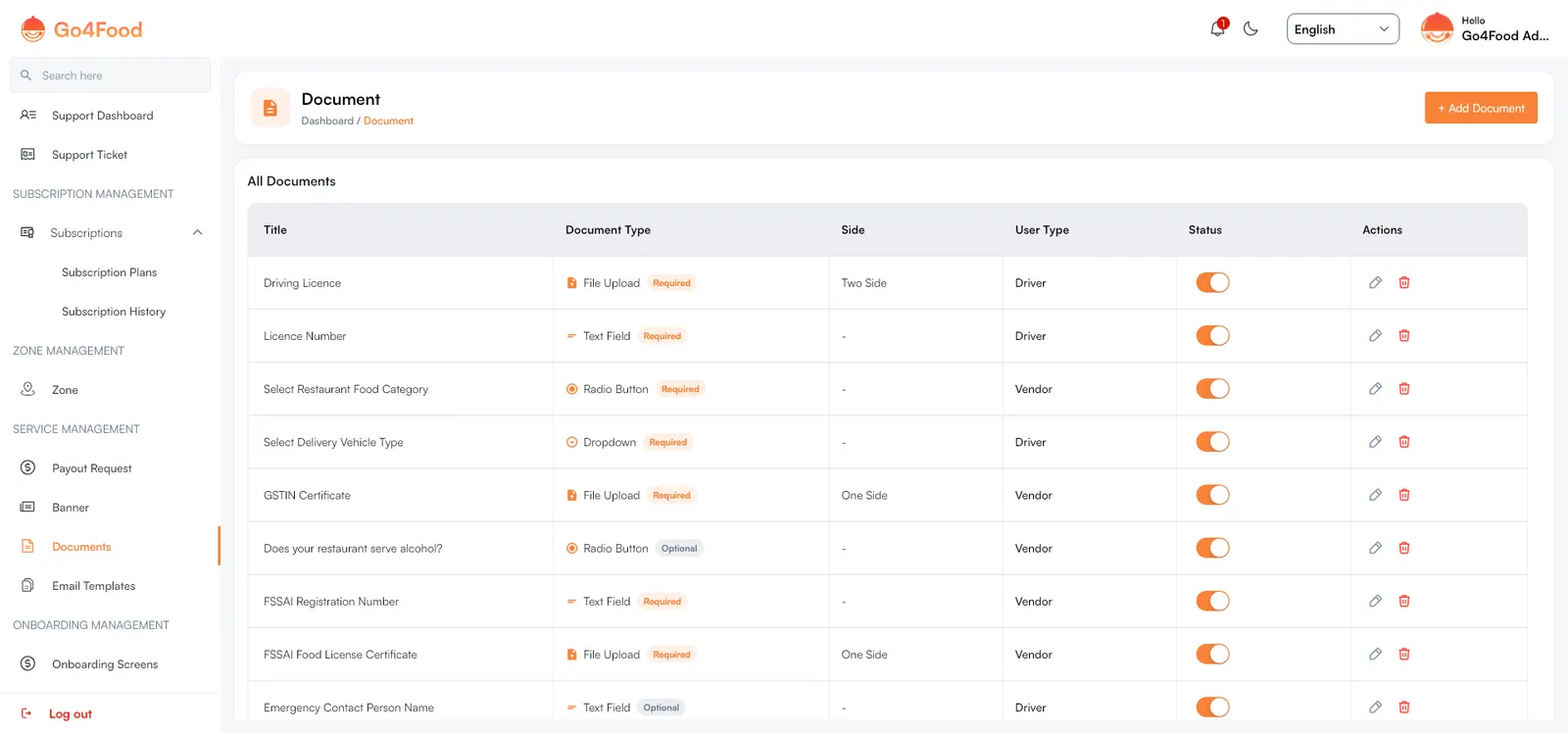
The table shows each document's Title, Document Type (with a Required or Optional badge), Side (for file uploads), User Type and Status. Use the pencil to edit and the bin to delete.
Add a document#
Click + Add Document and fill in the form.
| Field | What it does |
|---|---|
| User Type | Driver (asked in the Driver app) or Vendor (asked of restaurant owners in the Restaurant app and restaurant web panel). |
| Document Type | What the person submits. See the table below. |
| Required | On: the person cannot finish without it. Off: shown as Optional. |
| Document Title / Question | The name of the document (file uploads) or the question to answer (other types). Default tab required; add translations in the language tabs. |
| Help Text / Answer Placeholder | A short hint shown with the field. For text fields this is the placeholder inside the box. |
| Document Side | File uploads only. One Side asks for one image; Two Side asks for front and back. |
| Options | Dropdown and radio button only. Click Add Option for each choice; at least two are needed. Translate each option in the language tabs; empty translations show the default text. |
| Status | Only active documents are shown in the apps. |
Document types#
| Document Type | What the person sees | Example |
|---|---|---|
| File Upload | Upload a photo of the document (one or two sides). | Driving Licence, FSSAI Food License Certificate |
| Text Field | Type a short answer. | Licence Number, FSSAI Registration Number |
| Dropdown | Pick one option from a list. | Select Delivery Vehicle Type |
| Radio Button | Pick one of a few visible choices. | Does your restaurant serve alcohol? |
Click Save. The setup tool adds a few example documents; edit or replace them to match the rules in your country.
Keep at least one active document
While document verification is on for drivers or restaurants, keep at least one active document of that user type. The settings pages refuse to turn verification on without one, because people would otherwise wait for an approval that can never happen.
What happens in the apps#
- Drivers see the Driver documents as a step during sign-up, and can view or re-upload them later from the documents screen in the side menu. Their account stays unverified until you approve.
- Restaurant owners submit the Vendor documents while setting up their restaurant, and can see them from their profile. The owner stays unverified until you approve.
- Each document shows its status to the person: pending, approved or rejected (with your reason).
Approve or reject submissions#
New submissions wait for you here:
- Drivers: Delivery Boy ManagementDelivery BoyVerify Delivery Boy
- Restaurant owners: Restaurant ManagementRestaurantNew Restaurant Join Request
Open the review#
Click Review next to the person. Every document is listed with the uploaded images (front and back), or the answer they gave.
Approve or reject each one#
Click Approve, or Reject and give a reason. Quick reasons are offered, such as Photo is blurry or unreadable, Document has expired or Wrong document uploaded, or write your own. The person sees the reason and uploads the document again.
Confirm the vehicle or account#
For drivers, switch on Vehicle verified. For restaurant owners, switch on Account verified.
Save#
The person becomes verified only when every document is approved and the vehicle or account switch is on.
More about these screens: Delivery boys & payouts and Owners, restaurants & join requests.