

Foods, Cuisines & Categories
See and edit every restaurant's dishes, build a shared food catalog restaurants can import, and manage the cuisines, categories and sub categories used across the apps.
Restaurants usually add their own dishes in the restaurant app or web panel. Here you can see all of them, fix mistakes, and set up the lists the dishes are sorted into.
Menu ManagementFoodsFoods#

- 1Search dishes by item name.
- 2Add Food button to create a new menu offering.
- 3Food thumbnail, title, and dietary badges.
- 4Category assignment and parent restaurant kitchen.
- 5Item base price and live in-stock availability switch.
- 6Action buttons to view complete details, edit, or remove.
- The table shows Image, Name, Category, Restaurant Name, Created At, Price, In Stock and Action.
- In Stock shows or hides the dish for customers.
- Search by name, and use the eye, pencil and bin icons to view, edit or delete a dish.
Add or edit a dish#
Click + Add Item. The form asks for:
| Field | What to enter |
|---|---|
| Restaurant Name | The restaurant that sells the dish |
| Name and description | In each panel language (the Default language is required) |
| Image | A JPG, JPEG or PNG photo, cropped in the panel |
| Price, Discount Type, Discount | The price, and an optional Fixed or Percentage discount (at most 99%) |
| Category, Sub category | Where the dish is listed |
| Item Type | Veg, Non veg or Both |
| Item Tag | A label such as Spicy. Tags are managed in Item Tags under Settings (see Reasons, tags, rewards & more). |
| Food Preparation Time | Minutes to cook. Go4Food uses it for delivery time estimates. |
| Max Purchase Quantity | The most a customer can order at once |
| In Stock | Whether customers can order it now |
| Add ons | Optional extras with a name and price (for example Extra Cheese) |
| Add Variations | Choices such as size, each with options and prices |
Generate with AI
When AI is switched on in AI Setting, a Generate button fills in dish details for you. Check the text before you save.
Food details#
Click the eye icon to see a dish as the admin sees it.
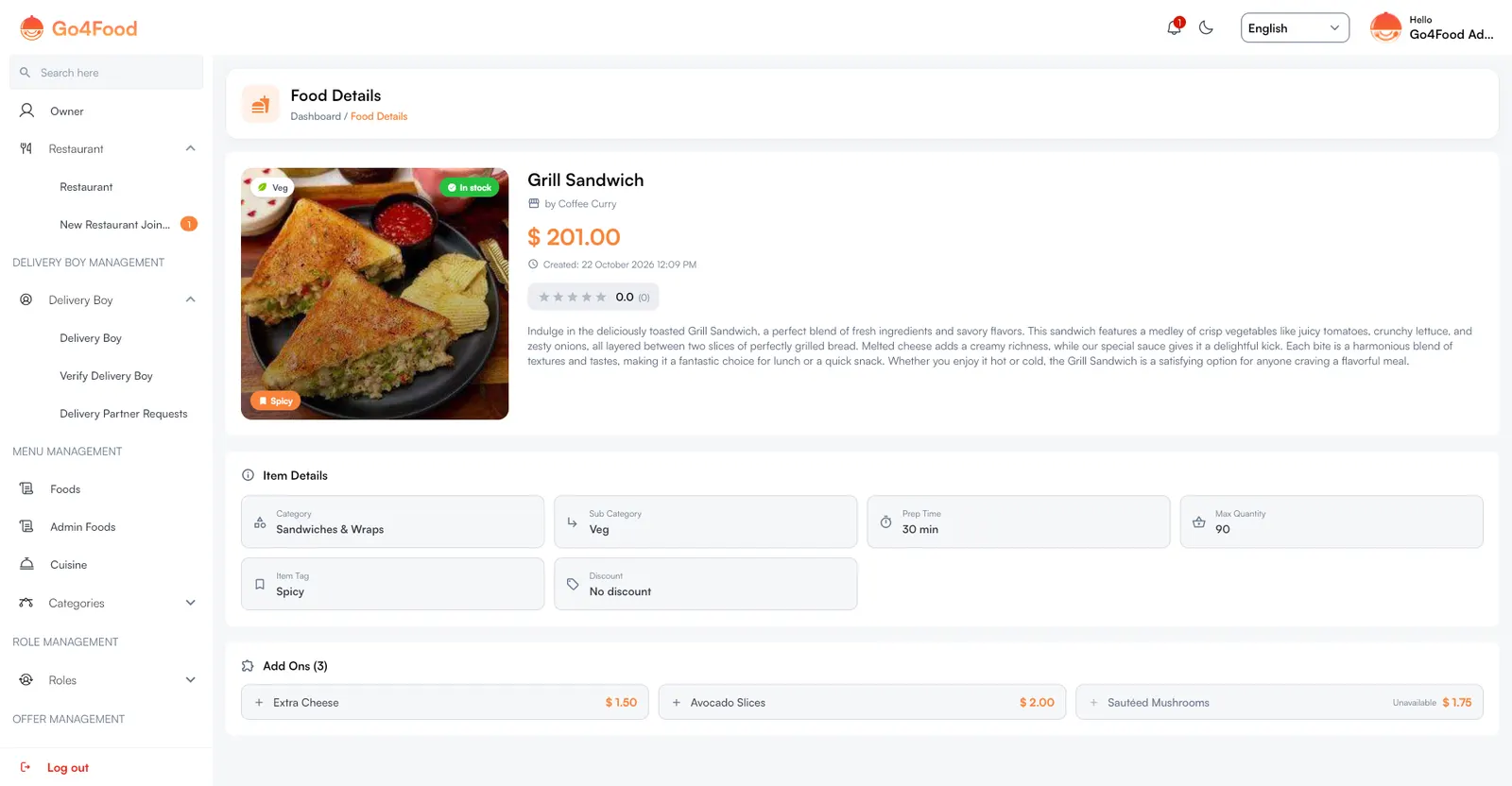
It shows the photo with Veg/Non veg, stock and tag badges, the restaurant, price, rating and description, then Item Details (category, sub category, prep time, max quantity, item tag and discount) and its Add Ons.
Admin Foods#
Admin Foods is a shared catalog of dishes that belongs to you, not to a restaurant. Restaurants can import dishes from it into their own menu in the restaurant app, instead of typing them in.
- Click + Add Item to add a dish. The form is the same as above, without the restaurant.
- Click Import Excel to add many dishes at once. Click Download Template first to get a file in the right format, and follow the Format Rules shown in the panel. Rows with mistakes are listed so you can fix them and upload again.
Cuisines#
Menu ManagementCuisine
Each restaurant has a cuisine (Indian, Italian, Thai…). Customers can browse restaurants by cuisine. Click + Add Cuisine, upload an image, enter the Cuisine Name and save. The Status switch hides or shows a cuisine.
Categories and sub categories#
Menu ManagementCategoriesCategories
- 1Overview summary counters: Total, Active, Inactive, and Sub-categories.
- 2Add Category button to register new food taxonomy.
- 3Category visual icon, title, and order rank.
- 4Sub-categories count linked under this parent.
- 5Active visibility switch and edit/delete controls.
Categories group dishes (Pizza, Biryani & Rice, Seafood…). The cards at the top count Total Categories, Active, Inactive and Sub Categories.
- Click + Add Category, upload an image (JPG, JPEG or PNG, up to 5 MB), enter the name and turn on Active to show it in the apps.
- The Sub Categories column shows how many sub categories each category has.
- Deleting a category also deletes its sub categories.
Open Sub Categories under Categories to add the next level (for example Veg and Non veg under Biryani). Click + Add Sub Category, choose the Category and enter the name.
Set these up first
Add your cuisines and categories before restaurants start adding dishes, so every dish can be placed correctly.