

Admin Panel
Admin Panel Tour
Your control centre in the browser. Everything about stores, products, riders, customers, money and settings lives here.
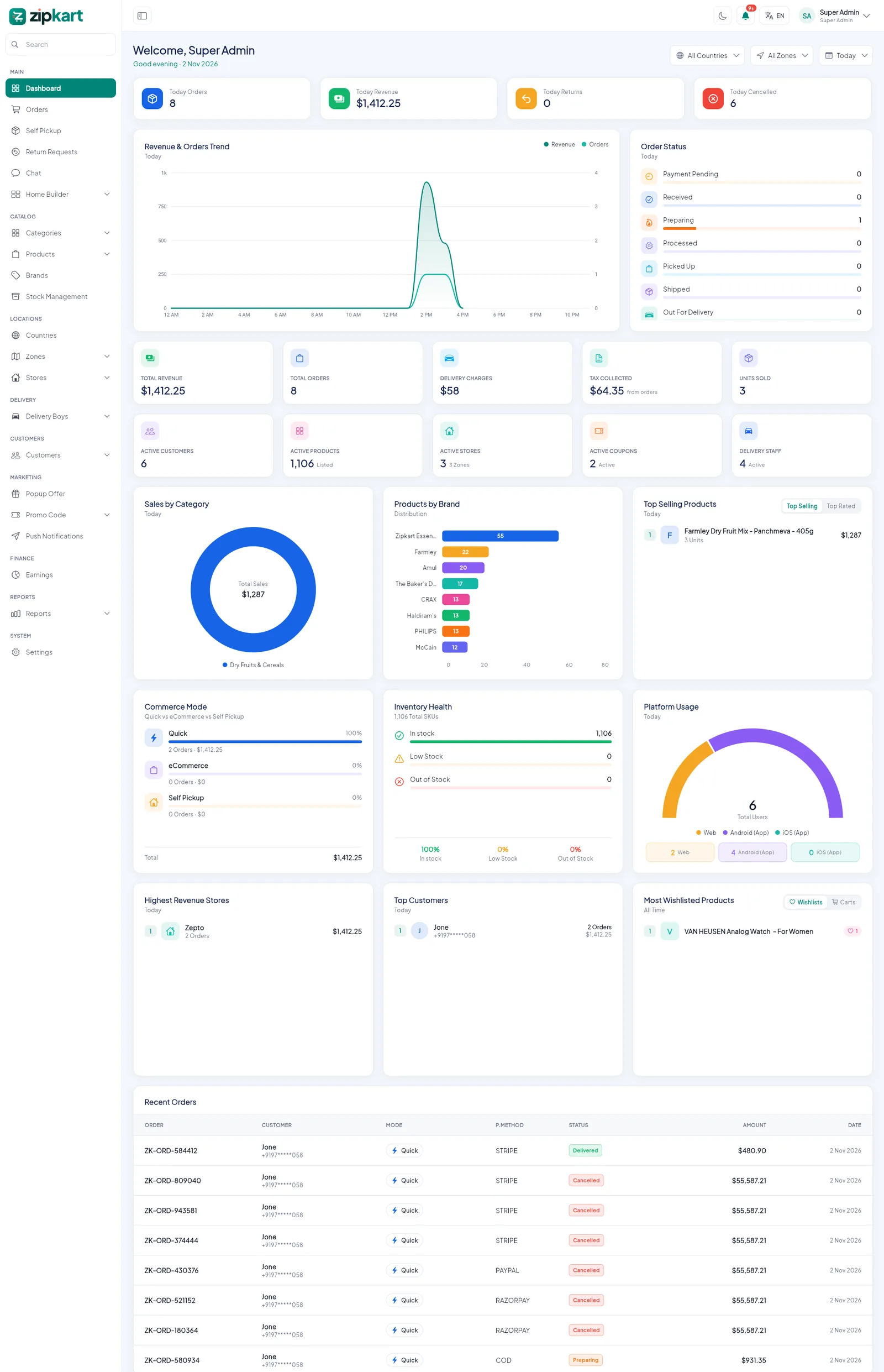
- 1The side menu: every admin page, grouped by area.
- 2Filter the whole dashboard by country, zone and period.
- 3Today's orders, revenue, returns and cancellations.
- 4Revenue and orders trend for the chosen period.
- 5Live count of orders in each status.
- 6Notification bell, panel language and your account.
What the dashboard shows#
| Block | What it tells you |
|---|---|
| Today cards | Orders, revenue, returns and cancellations for the chosen period |
| Revenue & Orders Trend | How sales move hour by hour or day by day |
| Order Status | How many orders are waiting, preparing, picked up, out for delivery |
| Totals | Revenue, orders, delivery charges, tax collected, units sold, active customers, products, stores, coupons and delivery staff |
| Sales by Category, Products by Brand | Where your sales come from |
| Top Selling Products, Top Customers, Highest Revenue Stores | Your best performers |
| Commerce Mode | Quick vs eCommerce vs Self Pickup share |
| Inventory Health | In stock, low stock and out of stock items |
| Platform Usage | Customers by Web, Android and iOS |
| Most Wishlisted Products | What customers want but have not bought yet |
| Recent Orders | The latest orders with status, payment method and amount |
The side menu#
| Group | Pages | Guide |
|---|---|---|
| Main | Dashboard, Orders, Self Pickup, Return Requests, Chat, Home Builder, Page Builder | Orders, Home Builder |
| Catalog | Categories, Attributes, Categories Order, Products, Bulk Upload / Update, Brands, Stock Management | Categories, Products |
| Locations | Countries, Zones, Stores, Store Payouts | Countries & Zones, Stores |
| Delivery | Delivery Boys, Requests, Wallets, Withdrawals, Documents, Settlements | Delivery Boys |
| Customers | Customers, Wishlists, Stock Alerts, Carts, Wallet Transactions, Withdrawals, Transactions | Customers |
| Marketing | Popup Offer, Promo Codes, Push Notifications | Marketing |
| Finance & Reports | Earnings, 12 reports | Reports & Earnings |
| System | Settings (every setting, in one place) | First-Time Setup |
Top bar tools
- The bell lists new orders, returns, withdrawal requests and rider sign-ups as they happen.
- EN switches the panel language. See Languages & RTL.
- The moon switches between light and dark mode.
- The search box at the top of the side menu jumps to any page.