

Languages & Right-to-Left
Add any language from the admin panel, upload a translation file per app, and right-to-left languages flip every screen. No new build needed.
All four apps (customer, store, delivery boy and admin) speak every language you add here. A text with no translation shows in English.
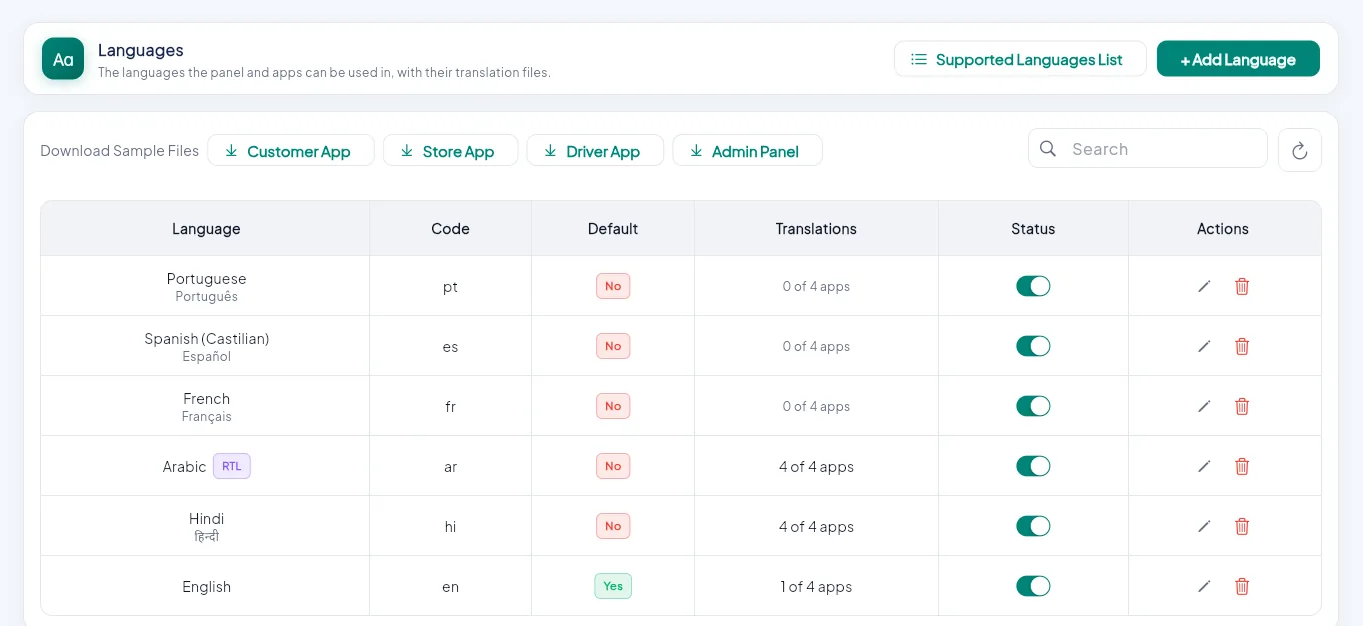
- 1Add a language, or pick one from the supported list.
- 2Download a sample file per app.
- 3The default language.
- 4How many apps are translated.
- 5RTL: the layout flips.
- 6Edit or delete.
Add the language#
SettingsLanguages → + Add Language. Pick it from the supported list (it fills in the name, code and native name), or type them. Turn on Right to left for Arabic, Urdu and similar languages.
Download the sample file#
Under Download Sample Files, click the app: Customer App, Store App, Driver App or Admin Panel. You get a file with every text of that app, in English on both sides.
Translate the right side only#
{
  "Add to Cart": "कार्ट में जोड़ें",
  "My Orders": "मेरे ऑर्डर",
  "Search products": "उत्पाद खोजें"
}
Never change the left side: it is what the app looks for. Lines you leave out show in English, so you can translate in parts.
Upload it#
Edit the language, upload the file for that app under Translation files (up to 900 KB) and Save. Repeat for each app.
How people pick a language#
When more than one language is active, a language menu appears: the Account tab in the phone apps, the top bar in the panels, and the language button on the customer website. The choice is remembered on the device.
Products, banners and messages#
Forms for products, categories, brands, attributes, promo codes, the home builder, content pages, cancel reasons, the maintenance message and notification texts have a tab per language. English is required; other languages are optional and fall back to English.
For developers: new texts
Write every new visible text in English with .tr, for example Text('Order placed'.tr). Then refresh the list used by the sample files and rebuild the admin panel:
cd admin
dart run tool/extract_translation_keys.dart