

Email (SMTP)
Connect your mail server so Zipkart can send order, welcome, password and payout emails. Then send yourself a test mail.
External costs are paid by you
Zipkart sends email through your own email provider, and runs on your own Firebase project, with your own Google Maps key if you choose Google Maps. These services charge you directly, not Zipkart. Most email providers (Gmail, SendGrid, Mailgun, Amazon SES, Brevo…) have a free tier with daily or monthly limits and charge per email beyond it; Firebase and Google Maps charge for use above their free amounts. Check each provider's current prices before you launch and set a budget alert. See Third-Party Services & Costs.
Open SettingsSMTP Mail Setting.
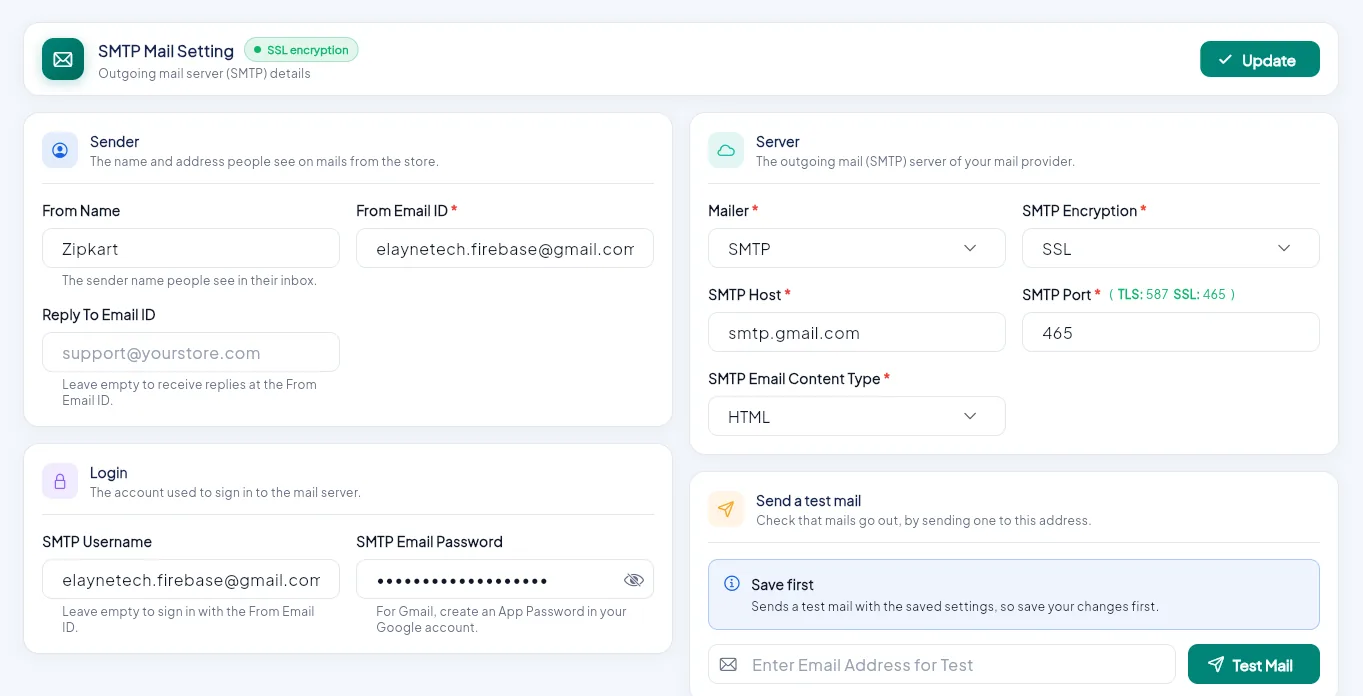
- 1Sender: the name and address customers see.
- 2Server: mailer, host, port and encryption.
- 3Login: the mail account username and password.
- 4Send a test mail.
- 5Update.
| Field | What to enter | Example (Gmail) |
|---|---|---|
| From Name | The sender name customers see | Your Shop |
| From Email ID | The sender address | orders@yourshop.com |
| Reply To Email ID | Where replies go (optional) | support@yourshop.com |
| Mailer | SMTP | SMTP |
| SMTP Encryption | SSL or TLS | SSL |
| SMTP Host | Your provider's server | smtp.gmail.com |
| SMTP Port | 465 for SSL, 587 for TLS | 465 |
| SMTP Email Content Type | HTML (recommended) | HTML |
| SMTP Username | The mail account (leave empty to use the From address) | orders@yourshop.com |
| SMTP Email Password | The account's password or app password |
Click Update, then type your own address under Send a test mail and click Test Mail. It sends with the saved settings, so save first.
Using Gmail?
Gmail needs an App Password, not your normal password. Turn on 2-step verification in your Google account, then create an app password and paste it here. For a busy shop, a transactional mail service (SendGrid, Mailgun, Amazon SES, Brevo…) is more reliable.
Which emails are sent
Order updates, welcome emails for customers and stores, password links, returns, wallet and payout updates. Switch each one on or off and change its text in Notification Templates. The password is stored where only the server can read it.