

Login Methods
Choose which sign-in buttons the customer app, the customer website and the delivery boy app show.
Open SettingsLogin Setting.
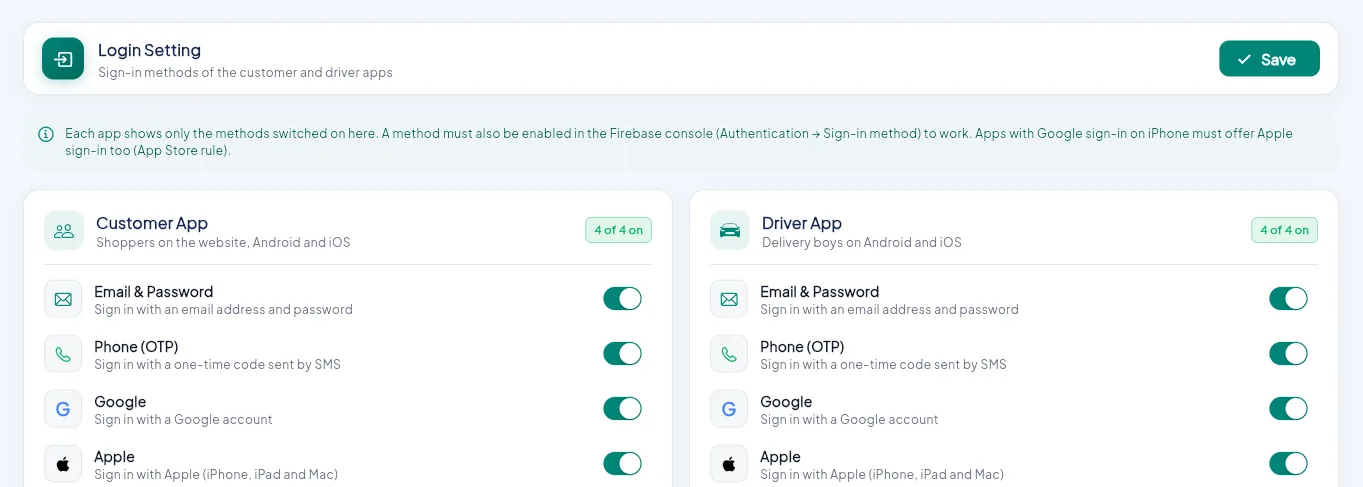
- 1A method must also be enabled in Firebase Authentication.
- 2Customer app and website: Email, Phone, Google, Apple.
- 3Delivery boy app: the same four methods.
- 4Save.
| Method | What the user does | Also needed |
|---|---|---|
| Email & Password | Signs up or in with email and password | Nothing |
| Phone (OTP) | Gets a one-time code by SMS | SMS is charged by Firebase. Android needs SHA keys. |
| Taps Continue with Google | Android needs the SHA-1 key; iPhone needs sign-in values | |
| Apple | Taps Continue with Apple | iPhone and the website only. Apple's App Store rules usually require it when an iPhone app offers Google sign-in. |
Switch methods on or off for each app and click Save. The apps show the new buttons the next time the login screen opens.
Enable it in Firebase too
A method also has to be turned on in Firebase consoleAuthenticationSign-in method. See Authentication. If it is on here but off in Firebase, the button shows but sign-in fails.
Store and admin logins
The store app, store panel and admin panel always use email and password. Store logins are created by you when you add a store.
Lower SMS costs
Phone sign-in is convenient but every code is an SMS you pay for. Offering Google, Apple or email next to it reduces the number of codes sent.